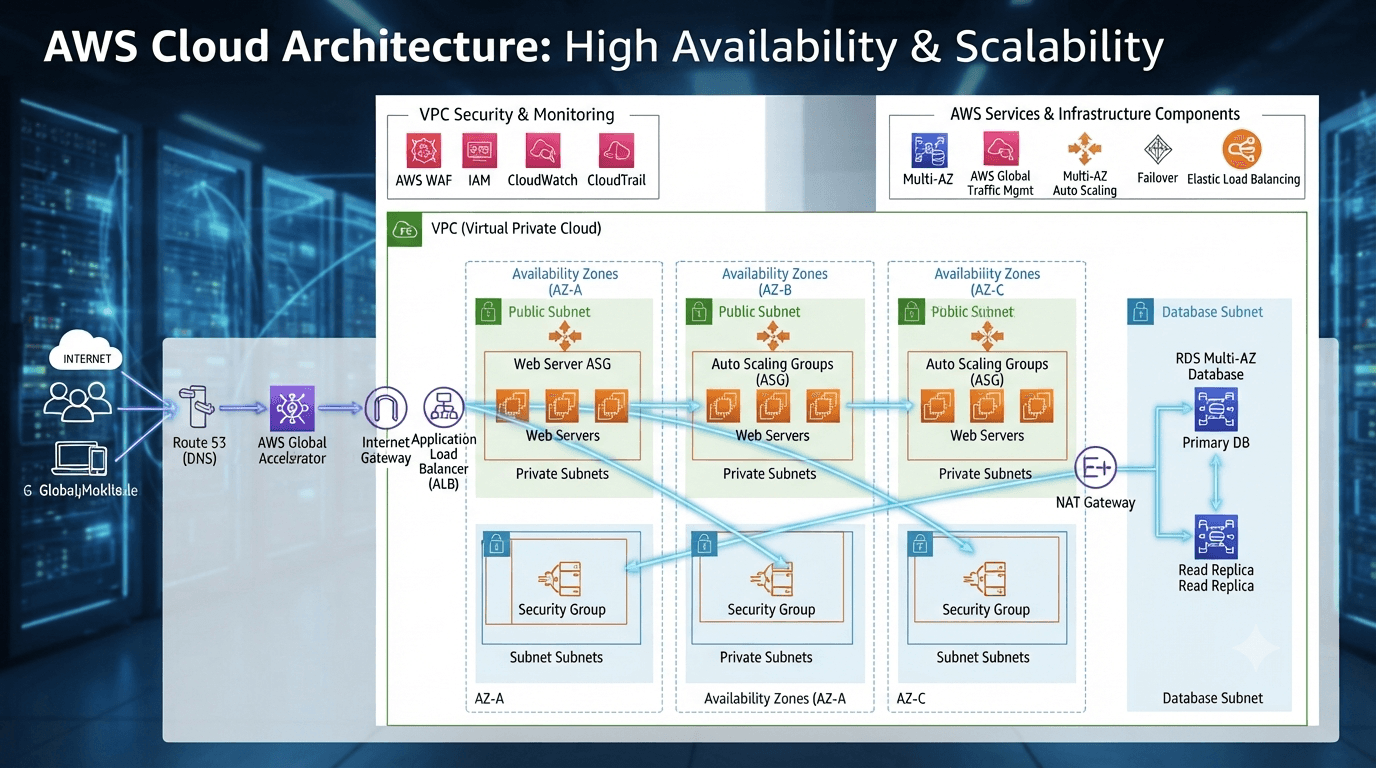
Load Balancing Explained: The Backbone of Scalable and Reliable Systems
As applications grow, a single server quickly becomes a bottleneck. Load balancing is one of the most important architectural patterns used to distribute traffic across multiple servers, ensuring high availability, better performance, and fault tolerance. This article explains what load balancing is, why it exists, how it works, and when you should use it in modern applications.
Written byMonir Hossain
Sep 2, 2026
13 min read
When building a small application, running everything on a single server may seem perfectly reasonable.
You deploy your backend, connect your database, point your domain to the server, and everything works.
But as traffic grows, the situation changes.
More users mean more requests. More requests mean higher CPU, memory, network, and connection usage. At the same time, users expect faster responses and uninterrupted access.
Eventually, a single server becomes a limitation.
This is where load balancing becomes important.
Load balancing is one of the foundational building blocks of scalable and highly available software systems. It allows applications to distribute traffic across multiple servers instead of depending on a single machine.
In this article, we'll look at:
What load balancing actually is
Why it became necessary
What problems it solves
How a load balancer works
Common load-balancing algorithms
Different types of load balancers
How to implement load balancing with Nginx, cloud platforms, and Kubernetes
When you actually need one
1. What Is Load Balancing?
A load balancer distributes incoming network traffic across multiple backend servers.
Instead of sending every request to one server, the load balancer decides which available server should handle each request.
Users
|
v
+--------------+
| Load Balancer|
+------+-------+
|
+-------+-------+
| | |
v v v
S1 S2 S3
Each server handles a portion of the traffic.
The result can be:
Better resource utilization
Higher availability
Easier horizontal scaling
Improved fault tolerance
The load balancer itself becomes the entry point between clients and the application servers.
2. Why Did Load Balancing Become Necessary?
In the early days of the web, a single server was often enough.
An application might look like this:
Users
|
v
Application Server
|
v
Database
As applications became more popular, several problems appeared:
Increasing traffic
Higher CPU and memory usage
More database connections
Performance bottlenecks
Higher availability requirements
Hardware failures
Users distributed across different geographic regions
A server has finite resources.
Even a powerful server can eventually reach a point where it cannot efficiently handle additional traffic.
At that point, one common solution is:
Add more application servers and distribute traffic between them.
This is called horizontal scaling.
3. A Simple E-Commerce Example
Imagine an e-commerce website during a major sale.
Suppose thousands of users start browsing products and placing orders simultaneously.
Without load balancing:
10,000 Users
|
v
+------------+
| Server 1 |
+------------+
Every request reaches the same server.
As traffic increases, CPU, memory, network connections, and application resources may become saturated.
With load balancing:
10,000 Users
|
v
+---------------+
| Load Balancer |
+-------+-------+
|
+-----------+-----------+
| | |
v v v
Server 1 Server 2 Server 3
The traffic is distributed across multiple application servers.
Now each server handles only a portion of the workload.
This doesn't magically solve every scalability problem—the database, cache, external services, and other components can still become bottlenecks—but it removes the application server as a single point of capacity.
4. What Problems Does Load Balancing Solve?
Load balancing provides several important benefits.
4.1 Server Overload
Every server has limited:
CPU
Memory
Network bandwidth
Connection capacity
If all traffic goes to one server, that server can become overloaded.
A load balancer distributes traffic across multiple instances.
Load Balancer
|
+-----------+-----------+
| | |
v v v
Server 1 Server 2 Server 3
33% 34% 33%
The exact distribution depends on the load-balancing algorithm and the workload.
Result
Better resource utilization and potentially better response times.
5. High Availability and Fault Tolerance
One of the biggest advantages of load balancing is that applications don't have to depend on a single application server.
Without redundancy:
Users
  |
  v
Server 1
X
Down
If Server 1 is unavailable, the application may become unavailable.
With multiple servers:
             Load Balancer
                  |
          +-------+-------+
          |               |
          v               v
       Server 1        Server 2
        DOWN             UP
                          |
                          v
                     Still Serving
                     Requests
The load balancer can detect unhealthy servers and stop routing new traffic to them.
This is commonly implemented through health checks.
For example:
GET /health

200 OK
If a server repeatedly fails its health checks, the load balancer can temporarily remove it from the healthy backend pool.
Result
Higher availability and better fault tolerance.
6. Horizontal Scalability
Suppose your application starts with one server:
Load Balancer
      |
      v
     S1
As traffic increases, you can add more servers:
             Load Balancer
                   |
       +-----------+-----------+
       |           |           |
       v           v           v
      S1          S2          S3
And later:
             Load Balancer
                   |
     +------+------+------+------+
     |      |      |      |      |
     v      v      v      v      v
    S1     S2     S3     S4     S5
This is horizontal scaling.
Instead of continuously upgrading one machine to a larger machine, you add more instances.
This approach is especially useful in cloud environments where application instances can be created and removed dynamically.
7. Maintenance Without Taking the Application Offline
Load balancing can also make deployments and maintenance easier.
The cloud provider manages much of the underlying infrastructure.
Depending on the service, you may get features such as:
Health checks
TLS/SSL termination
Automatic scaling integration
High availability
Traffic routing
Integration with container platforms
15. How Can You Implement Load Balancing?
There are several common approaches.
Option 1: Nginx
One traditional approach is placing Nginx in front of multiple application servers.
Internet
|
v
Nginx
|
+-----------+-----------+
| | |
v v v
S1 S2 S3
A simplified Nginx configuration might look like:
upstream backend {
server 10.0.0.1;
server 10.0.0.2;
server 10.0.0.3;
}
server {
listen 80;
location / {
proxy_pass http://backend;
}
}
Nginx receives the request and proxies it to one of the configured backend servers.
16. Option 2: Cloud Load Balancer
If your application runs on AWS, Google Cloud, Azure, or another cloud platform, you can use a managed load balancer.
A simplified architecture might look like:
Internet
|
v
Cloud Load Balancer
|
+--------+--------+
| | |
v v v
S1 S2 S3
The cloud platform handles much of the infrastructure management.
This can make it easier to integrate:
Auto scaling
Health checks
TLS certificates
Monitoring
Multiple availability zones
Container services
17. Option 3: Kubernetes Ingress
In Kubernetes environments, external HTTP/HTTPS traffic is commonly routed through an Ingress or Gateway-based architecture.
A simplified example:
Internet
|
v
Ingress / Gateway
|
+----------+----------+
| | |
v v v
Pod Pod Pod
The routing layer sends requests to healthy application pods.
In modern Kubernetes environments, the exact implementation may involve an Ingress Controller or the newer Gateway API model.
18. Health Checks
Load balancing isn't just about distributing traffic.
The load balancer also needs to know:
Which servers are healthy?
For example:
GET /health
A healthy server might respond:
HTTP 200 OK
If a server repeatedly fails:
Server 2
↓
Health check failed
↓
Marked unhealthy
↓
Traffic stopped
The traffic can then continue through healthy servers:
Load Balancer
|
+-----+-----+
| |
v v
S1 S3
S2
Unhealthy
Health checks are a critical part of high-availability architectures.
19. Stateless Applications Make Load Balancing Easier
There is an important architectural consideration when running multiple application servers:
Ideally, application servers should be stateless.
Suppose a user logs in and the session exists only in Server 1's memory:
User
|
v
Server 1
|
Session stored in memory
The next request could be sent to Server 2:
User
  |
  v
Load Balancer
|
v
Server 2
Server 2 doesn't know about the session stored in Server 1.
This can cause problems.
Modern applications often solve this by storing shared state in an external system such as:
Redis
A database
A dedicated session store
Or they use stateless authentication mechanisms such as appropriately designed token-based authentication.
This allows any application server to handle a request.
              Load Balancer
                    |
       +------------+------------+
       |            |            |
       v            v            v
      S1           S2           S3
       \            |            /
        \           |           /
         +----------+----------+
                    |
                  Redis
The key idea is:
Don't make a single application server responsible for state that another server needs.
20. When Should You Use a Load Balancer?
A common question is:
"Do I need a load balancer right now?"
The answer depends on your requirements.
You Probably Don't Need One Yet If:
You're building a small personal project
You're creating a portfolio website
You're running a small internal application
Traffic is low
Downtime has limited consequences
One server has sufficient capacity
Your architecture might simply be:
Users
  |
  v
Single VPS
  |
  v
Application
There is nothing wrong with this.
In fact, adding unnecessary infrastructure too early can increase complexity and cost.
21. When Should You Consider One?
A load balancer becomes more valuable when:
Traffic is growing
A single server is approaching its capacity
Downtime has significant business consequences
Multiple application servers already exist
High availability is required
You need rolling deployments
You want horizontal scaling
Your infrastructure spans multiple availability zones or regions
A simplified architecture becomes:
Users
  |
  v
Load Balancer
  |
  +-------+-------+
  |       |       |
  v       v       v
 S1      S2      S3
At this stage, the load balancer isn't merely a performance optimization.
It becomes an important part of the application's availability and scaling strategy.
22. Real-World Example: E-Commerce During a Major Sale
Imagine an e-commerce platform experiencing a major traffic spike.
Suppose the application suddenly receives hundreds of thousands of requests.
A simplified architecture could look like:
                    Users
                      |
                      v
                    CDN
                      |
                      v
              Load Balancer
                      |
          +-----------+-----------+
          |           |           |
          v           v           v
         S1          S2          S3
          |           |           |
          +-----------+-----------+
                      |
                    Cache
                      |
                      v
                   Database
The load balancer distributes requests among application servers.
But notice something important:
The load balancer isn't doing everything.
A real production system may also need:
CDN caching
Redis caching
Database optimization
Read replicas
Queue-based background processing
Auto scaling
Monitoring
Rate limiting
Connection pooling
Load balancing solves one important part of the scalability problem: distributing traffic across application instances.
It does not automatically make every component of the system scalable.
23. Load Balancing vs Auto Scaling
These concepts are often confused.
Load Balancing
Determines:
Which server should handle this request?
Auto Scaling
Determines:
How many servers should exist?
They often work together.
For example:
Traffic increases
       |
       v
Auto Scaling
       |
       v
New Server Created
       |
       v
Load Balancer
       |
       v
Server joins traffic pool
When traffic decreases:
Traffic decreases
       |
       v
Auto Scaling
       |
       v
Server Removed
So:
Auto scaling changes the number of servers. Load balancing distributes traffic among them.
24. The Bigger Picture
Load balancing is only one piece of a scalable architecture.
A simplified production architecture might eventually look like:
                         Users
                           |
                           v
                          CDN
                           |
                           v
                    Load Balancer
                           |
              +------------+------------+
              |            |            |
              v            v            v
             S1           S2           S3
              |            |            |
              +------------+------------+
                           |
                    +------+------+
                    |             |
                    v             v
                  Redis        Database
                                  |
                           +------+------+
                           |             |
                           v             v
                       Primary       Replica
As systems grow further, you may introduce:
Message queues
Background workers
Object storage
Search systems
Multiple database replicas
Observability platforms
Service discovery
Multi-region deployments
Load balancing fits into this larger architecture as one of the mechanisms that helps applications handle traffic reliably.
Conclusion
Load balancing is not simply a tool for making applications faster.
It is an architectural pattern that helps applications become:
Scalable
Highly available
Fault tolerant
Easier to maintain
Capable of handling increasing traffic
The fundamental idea is simple:
Don't force one server to handle everything when multiple servers can share the workload.
A load balancer sits between users and application servers and decides where incoming traffic should go.
As your application grows, the architecture can evolve:
Small Application

Users
  |
  v
Server


          ↓


Growing Application

Users
  |
  v
Load Balancer
  |
  +---+---+---+
  |   |   |   |
  S1  S2  S3  S4
But remember: adding a load balancer doesn't automatically make an application scalable.
You also need to consider:
Stateless application design
Database scalability
Caching
Connection management
Background processing
Health checks
Monitoring
Auto scaling
The important lesson is to introduce this complexity when your application's requirements justify it.
For a small personal project, a single VPS may be perfectly appropriate.
For a growing production system where availability, traffic, and horizontal scaling matter, load balancing becomes one of the fundamental building blocks of the architecture.
Start simple. Understand the bottleneck. Then scale the part that actually needs scaling.
#Load Balancer
#System Design
#Software Architecture
#Scalability
#Backend Engineering
MH
About the author
Monir Hossain
Full-stack developer from Bangladesh, focused on building modern web applications, backend systems, and practical developer experiences.